You added an llms.txt file. Most site owners never get that far. But here's what most guides skip: having an llms.txt file does not mean it's a good one.
A file with the wrong structure, missing sections, or outdated content confuses AI crawlers rather than helping them. The difference between a useful file and a pointless one isn't whether it exists — it's what's inside and how it's organized.
This audit takes five minutes. By the end, you'll have a clear list of what to fix, what to keep, and whether your file is working for you or sitting there doing nothing.
3 Signs Your llms.txt Needs an Audit Right Now
You don't need to run this every week. But pull up your file today if any of these are true:
- You wrote it more than three months ago and haven't touched it since
- You've added or removed major sections of your site — a new product line, a blog, a docs section
- You generated the file with a tool and never reviewed what it actually produced
- Your site changed — new pricing, renamed features, discontinued products — but the file didn't
Any one of these is enough. A stale llms.txt is worse than a basic one because it feeds AI models confidently wrong information about your site.
The 5‑Minute llms.txt Audit Checklist
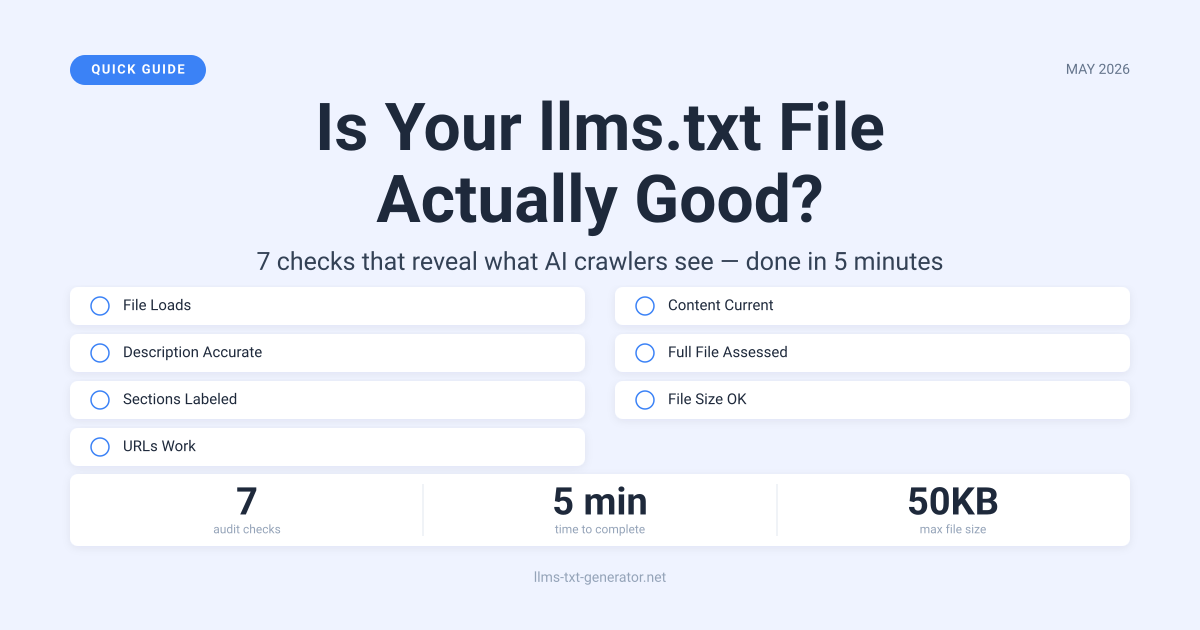
Open your file at yourdomain.com/llms.txt and work through these seven checks. Each one takes under a minute.
Check 1: Does the File Load?
Go to https://yourdomain.com/llms.txt in a browser. You should see plain text. A 404 error, a redirect, or an HTML page means the file isn't reachable by crawlers. Fix this first — everything else is pointless until the file actually loads.
Check 2: Is Your Site Description Accurate?
Your file must start with a top‑level heading (#) and a short description — 2 to 5 sentences — that explains what your site does, who it's for, and why it matters. This section gets more weight from AI models than anything else in the file. If it's vague, generic, or out of date, your whole file underperforms.
Check 3: Are Your Sections Clearly Labeled?
Content after the description should be grouped under ## headings. Common labels: Docs, Blog, Products, API, Support. Without clear section labels, AI crawlers guess at your structure. They're often wrong.
Check 4: Do Your URLs Still Work?
Pick 10 URLs at random from your file and check them. Broken URLs are the most common llms.txt problem — they pile up after redesigns, CMS migrations, and content reorganizations. A crawler that keeps hitting dead links doesn't just miss that content. It starts treating your whole file as unreliable.
Check 5: Is the Content Still Current?
Read your description and section summaries. Does this describe your site as it is today? Old pricing tiers, renamed features, discontinued products, and outdated positioning all create problems. If you'd cringe seeing this text show up in a generated AI response, fix it now.
Check 6: Do You Need an llms‑full.txt?
For content-heavy sites — documentation portals, knowledge bases, large technical blogs — a companion llms-full.txt file includes the full text of important pages, not just links. If your site has detailed content that AI models would benefit from reading directly, it's worth adding. See our comparison of llms.txt vs llms‑full.txt if you're not sure which you need.
Check 7: Is the File a Reasonable Size?
Under 50KB is a reasonable target for most sites. A 500KB file crammed with every URL on your domain isn't a curated context document — it's a data dump. If you can't explain why a URL deserves to be there, it probably shouldn't be.
Audit Scorecard
Score your file honestly. A 5/7 tells you something useful. A 2/7 tells you to start over.
| Check | What You're Testing | Pass Condition |
|---|---|---|
| 1. File loads | Is /llms.txt accessible? |
Plain text at the URL, no errors or redirects |
| 2. Description accuracy | Does it describe the site correctly? | Correct name + 2–5 accurate sentences |
| 3. Section labels | Is content grouped clearly? | All major content areas have named ## headings |
| 4. URL integrity | Do linked pages still exist? | 10 random URLs return 200 status |
| 5. Content currency | Is everything still accurate? | No stale product names, pricing, or features |
| 6. Full file assessed | Do you need an llms‑full.txt? | Decision made — present or confirmed unnecessary |
| 7. File size | Is it focused, not exhaustive? | Under 50KB for most sites |
What These Problems Actually Look Like
Every one of these shows up on real sites. Here's what to watch for.
Vague or Missing Description
What it looks like: "This is a website about technology and tools." Or just the site name with nothing below it.
The description is the primary context AI models use to understand your site. Vague descriptions produce vague, low‑confidence citations. Research on how AI models actually read llms.txt files shows the intro section carries more weight than any other part of the file.
Fix: Write 3–5 specific sentences. Name who you help, what exact problem you solve, what sets you apart, and who your primary audience is. Treat it like the opening paragraph of a landing page — because that's what it does for AI models.
Dead URLs
What it looks like: Entries that return 404 errors, redirect to unrelated pages, or point to content that no longer exists.
A file with 20% broken links performs materially worse than one with your 20 best pages. Crawlers that keep hitting dead ends start treating the whole file as unreliable.
Fix: Remove broken entries or update the URLs. If the content moved, track it down and fix the link. If it's gone, cut the entry entirely.
Auto‑Generated, Never Reviewed
What it looks like: Every page on the domain listed — admin pages, pagination URLs, tag archives, filtered product views, internal search results. Or a description that reads like a form was filled out.
Generators are starting points, not finished products. Think of it this way: if you handed a journalist 400 URLs and asked them to explain your company, they'd pick the 20 most useful ones. Your llms.txt needs that same editorial judgment.
Fix: Use the generator to create a fresh baseline, then cut anything that doesn't clearly represent what your site does. Rewrite the description in your own words.
Outdated Product Information
What it looks like: Feature names that changed, pricing tiers that no longer exist, products that were discontinued or rebranded.
When AI models cite your site based on stale data, they give users wrong information. That damages trust — and it's harder to fix once it spreads through AI responses.
Fix: Tie llms.txt reviews to product releases. A 10-minute check after any significant product change is usually enough.
What a Good llms.txt File Actually Looks Like
Strong files share four things:
- Reads like a briefing, not a sitemap. Someone should be able to read it and accurately summarize your site to a colleague in two minutes — without clicking a single link.
- Every URL earns its place. Not pagination, not tag archives, not admin paths — only pages that stand alone as useful content.
- Structure reflects your actual site hierarchy. If documentation is your most important content, it comes first. If your blog drives most discovery, it's prominent. Don't fake a structure that doesn't exist.
- The description is direct. AI models flag hedged claims and marketing boilerplate. Specific, honest descriptions consistently outperform vague promotional language.
For a more detailed quality standard, our llms.txt best practices guide covers 10 rules worth checking before you finalize your file.
How to Fix It Quickly
Scored 4/7 or below? Start fresh rather than patching. Here's the fastest path:
- Run your site through the llms.txt generator to get a new baseline
- Compare the output to your audit notes
- Rewrite the description to reflect your site today
- Remove URLs that don't belong
- Deploy the updated file at
/llms.txt - Re‑run all seven checks to confirm
Scored 5/7 or higher? You likely need targeted fixes only — a URL cleanup, an updated description, or a size trim. No reason to start over.
How Often to Run This Audit
Quarterly is enough for most sites. The exceptions:
- E-commerce: Audit when your product catalog changes significantly
- SaaS: Audit when a major feature ships or gets deprecated
- Content sites: Audit when your content categories shift or you migrate platforms
- After any site migration: Always — URL structures change, and your file becomes a map to somewhere that no longer exists
The simplest system: add a 15‑minute "llms.txt check" to your release checklist for major updates. Most of the time it'll be a two‑minute skim. Once in a while it'll catch something that would have caused problems for months.
Conclusion
Having an llms.txt file is step one. Having a good one is what actually changes how AI models understand and cite your site. This audit takes five minutes and gives you a concrete picture of where your file stands. Run it now, fix what's broken, and use the generator to rebuild from scratch if the gaps are too wide to patch.
Frequently Asked Questions
How do I know if my llms.txt is being crawled by AI models?
Check your server access logs for requests to /llms.txt from known AI crawler agents: GPTBot, ClaudeBot, PerplexityBot, and others. Our guide on verifying AI crawl activity covers the exact patterns to look for and which log entries matter.
Can a poorly written llms.txt actually hurt my AI discoverability?
Yes. A file with broken URLs, stale descriptions, or misleading content gives crawlers wrong information. Best case: they ignore the file. Worst case: they use the bad data to misrepresent your site in generated responses — and that's hard to walk back once it's out there.
How long should an llms.txt file be?
Most effective files land between 1KB and 50KB. Shorter usually means better. A focused file with 30 well-chosen entries consistently outperforms a 500-entry dump because it signals clearer priorities to AI models. They pay more attention to files that feel curated.
Do I need an llms-full.txt as well?
Only if your site has detailed technical content — documentation, research, in‑depth guides — that AI models would benefit from reading directly rather than just linking to. For straightforward marketing sites and product pages, a standard llms.txt is sufficient.
What sections should my llms.txt include?
At minimum: a top‑level description, then one section per major content area. Common sections are Docs, Blog, Products, API Reference, and Support. Map your sections to your actual site structure — not to an idealized version of it.
Can I use the same file across multiple domains?
No. Each domain needs its own file, written for that site's specific content and audience. A generic shared file tells AI crawlers nothing useful and may cause them to lose confidence about which content belongs where.
Should I include every page on my site?
No — this is one of the most common mistakes. Only include pages that meaningfully represent what your site does. Skip pagination, tag archives, internal search results, login pages, and anything that doesn't stand on its own as useful content.
How do I confirm my llms.txt URL isn't broken?
The direct test: open https://yourdomain.com/llms.txt in a browser. Plain text means it's accessible. A 404, an HTML page, or a login redirect means it's broken. For a technical check, run curl -I https://yourdomain.com/llms.txt and confirm the HTTP status code is 200.
What's the difference between llms.txt and robots.txt?
robots.txt controls access — it tells crawlers what they're allowed or not allowed to fetch. llms.txt provides context — it tells AI models what your site is about and which content matters most. They do different jobs and both belong on every site.
How do I regenerate my file quickly if the audit shows serious problems?
The fastest path: run your site through the generator again to get a fresh baseline, then apply your audit notes on top. For most sites, it's faster to regenerate and curate than to fix a file that's been accumulating errors for months.