You uploaded llms.txt to your site root. Maybe you tested it in a browser — the file loads, the syntax looks right. But now what? How do you know whether GPTBot, ClaudeBot, or PerplexityBot have actually found it and read it?
This is the question most llms.txt guides skip entirely. They cover implementation but leave you with no way to confirm it's working. The result: site owners either assume the file is being crawled (and can't prove it) or assume it isn't (and give up too early).
This guide covers three practical verification methods — server log analysis, direct AI testing, and bot traffic tools — that give you concrete evidence of crawl activity. By the end, you'll know exactly whether your llms.txt is being read, and what to do if it isn't.
The Three Verification Methods at a Glance
Each method has different requirements and gives you a different type of evidence. Use the table to pick the right one for your setup.
Method | What It Tells You | Time Required | Technical Level |
|---|---|---|---|
Server Access Logs | Exact crawl timestamps, IP, user-agent string | 5–10 minutes | Moderate (log access needed) |
Ask the AI Directly | Whether the AI can retrieve and summarize your llms.txt right now | 2 minutes | Low (no tools needed) |
Bot Traffic Analytics | Aggregate bot visit counts and top pages by bots | 2–5 minutes | Low (Cloudflare or GA4) |
The fastest test is Method 2 — ask Claude or Perplexity to visit your llms.txt and describe what it says. A coherent, accurate response is strong evidence the file is being read. Start there, then use server logs to confirm the crawl timestamps.
Method 1: Check Your Server Access Logs
Server access logs record every HTTP request to your site — including bot visits. AI crawlers identify themselves using standard user-agent strings, which makes them easy to find in your logs.
What to Look For
The three major AI crawlers that read llms.txt use these user-agent identifiers:
GPTBot— OpenAI's crawler (ChatGPT)ClaudeBot— Anthropic's crawler (Claude)PerplexityBot— Perplexity AI's crawler
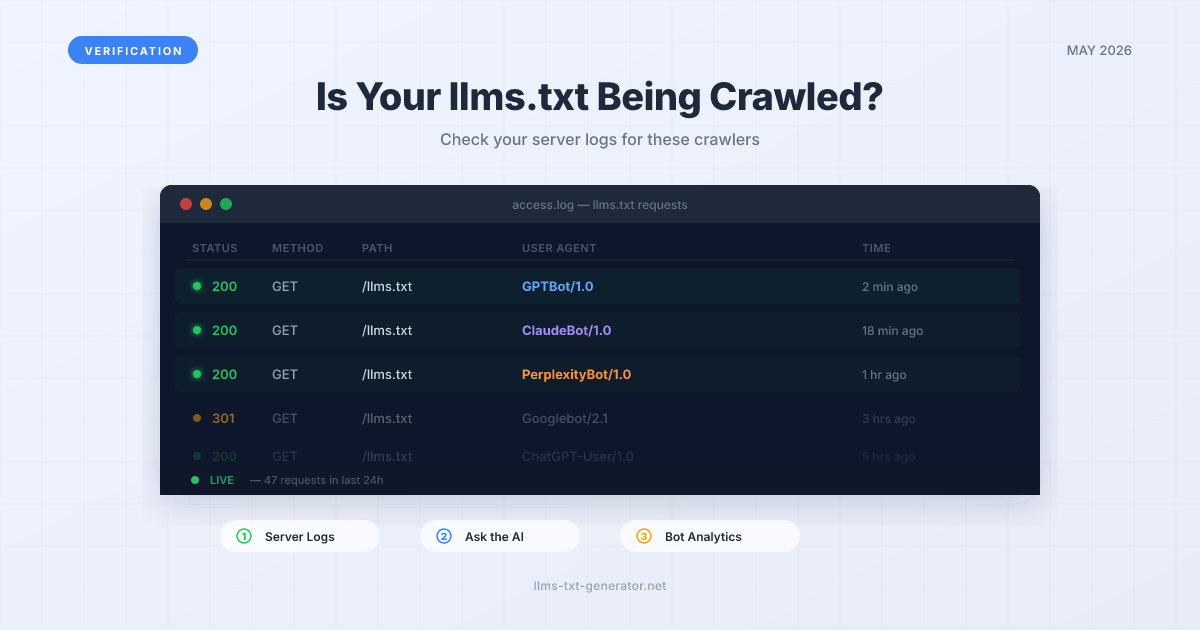
A log entry confirming a GPTBot crawl of your llms.txt looks like this:
66.249.64.12 - - [04/May/2026:09:42:11 +0000] \"GET /llms.txt HTTP/1.1\" 200 1842 \"-\" \"Mozilla/5.0 (compatible; GPTBot/1.1; +https://openai.com/gptbot)\"
The key fields: the path (/llms.txt), the status code (200 means success), and the user-agent string (GPTBot/1.1).
How to Access Your Logs
Access method depends on your hosting setup:
cPanel hosting: Log into cPanel → Metrics → Raw Access → download the access log for your domain
VPS / dedicated server: SSH in and run
grep -i \"llms.txt\" /var/log/nginx/access.log(orapache2/access.log)Cloudflare: Enable Cloudflare Logs in your dashboard → filter by URL path
/llms.txtVercel / Netlify: Check the built-in Functions or traffic logs in your project dashboard
To filter just for AI bot visits to your llms.txt on Linux/Mac, run:
grep \"llms.txt\" access.log | grep -E \"GPTBot|ClaudeBot|PerplexityBot\"
If you see matching lines, crawl activity is confirmed. No results doesn't mean the bots haven't been — it may mean logs don't go back far enough, or the file was recently published. Give it 2–4 weeks before drawing a conclusion.
Method 2: Ask the AI Directly
This is the fastest and most intuitive verification method — and it requires no technical tools. AI assistants with live web retrieval can fetch your llms.txt in real time and tell you what it says.
The Exact Prompt to Use
Open a new conversation in Claude, Perplexity, or ChatGPT with Browse enabled, and send this message:
Please visit https://yourdomain.com/llms.txt and tell me exactly what it says.
Replace yourdomain.com with your actual domain. A successful response looks like: the AI accurately summarizes your site description, lists the URLs you included, and paraphrases your content sections. That's confirmation the file is accessible and parseable by AI retrieval systems.
How to Interpret the Response
Accurate summary of your content: The file is accessible and the AI can read it — strong positive signal
\"I can't access external URLs\" or similar refusal: The specific AI session doesn't have web browsing enabled — try a different model or enable the browsing tool
Hallucinated or inaccurate content: The AI may be drawing from cached training data rather than a live fetch — try Perplexity, which always retrieves live
\"404 Not Found\" or access error: Your llms.txt isn't publicly accessible at the expected path — recheck the upload
Perplexity is the most reliable for this test because its product is built entirely on real-time retrieval. Every Perplexity response cites sources and fetches live — making it the closest proxy to what PerplexityBot does during an actual crawl.
For detailed background on which crawlers support llms.txt and how each one works, see our complete AI crawler reference guide.
Method 3: Bot Traffic Analytics
If you use Cloudflare, Google Analytics 4, or a similar analytics platform, you can check aggregated bot traffic data without digging into raw logs.
Cloudflare Analytics
Cloudflare's analytics dashboard has a bot traffic breakdown if you're on a Pro plan or above:
Go to your Cloudflare dashboard → select your domain
Navigate to Analytics & Logs → Traffic
Filter by \"Bots\" in the traffic type selector
Look for GPTBot, ClaudeBot, or PerplexityBot in the top crawlers list
The free plan shows aggregate bot vs. human traffic. The Pro plan breaks it down by bot type. Even the free plan is useful — a spike in bot traffic after publishing your llms.txt is a reasonable indicator of crawl activity.
Google Search Console (Crawl Stats)
Google Search Console tracks Googlebot crawl activity in detail — but Googlebot does not read llms.txt, so this won't confirm AI crawler activity directly. It's still useful as a baseline: if Googlebot is crawling your site regularly, you know your server responses are clean and accessible to bots generally.
For confirming GPTBot, ClaudeBot, or PerplexityBot activity, server logs or the direct AI test (Method 2) are more reliable than Search Console.
What to Do If No Bot Has Visited Yet
If your logs show no AI bot visits after publishing llms.txt, don't panic. AI crawlers don't visit sites on a fixed schedule — crawl frequency depends on site age, domain authority, update frequency, and whether the site has been crawled before.
Here are the most common reasons a new llms.txt hasn't been crawled yet, and what to do:
The file is too new. Give it 2–4 weeks. AI crawlers tend to revisit on cycles of weeks to months, not hours.
The site is new or low-traffic. Sites with recent launch dates or limited inbound links get crawled less frequently. Build a few backlinks and submit your sitemap to Google to increase overall crawl priority.
robots.txt is blocking the crawler. Open your
robots.txtand confirm there is noDisallow: /llms.txtor blanketDisallow: /that would block GPTBot, ClaudeBot, or PerplexityBot.The file is returning a non-200 status. Test
curl -I https://yourdomain.com/llms.txt— it should return200 OKwithContent-Type: text/plain.
If you haven't created your llms.txt yet, generate one free — it takes under 5 minutes and gives crawlers an immediate reason to index your best content.
Interpreting Crawl Evidence: What Actually Matters
Seeing a GPTBot or ClaudeBot visit in your logs doesn't guarantee your content will be cited in AI responses — but it confirms the pipeline is open. The crawl gets your content into the AI's index. After that, citation depends on topic relevance, content quality, and whether the AI's retrieval system scores your page as authoritative for the user's query.
What the verification steps above actually tell you:
Your llms.txt file is accessible and returns a valid response (Method 2)
AI crawlers have visited the file (server logs)
Bot traffic to your domain is consistent with normal crawl behavior (analytics)
If all three check out, your side of the equation is done. The rest — frequency of citation, which queries surface your content — is determined by the AI's relevance algorithms, not by additional llms.txt changes.
For deeper context on how llms.txt fits into the broader AI discoverability picture, see our guide on what llms.txt is and how it works.
Conclusion
Verifying your llms.txt is being crawled takes under 5 minutes using the direct AI test: ask Claude or Perplexity to retrieve your file and describe what it says. For a permanent audit trail, check your server access logs for GPTBot, ClaudeBot, and PerplexityBot entries. If you haven't set up your llms.txt yet, generate yours free and upload it today — the sooner it's live, the sooner the crawlers find it.
Frequently Asked Questions
How long does it take for AI crawlers to find a new llms.txt?
There's no fixed timeline — AI crawlers don't publish their crawl schedules. Based on observed patterns, sites with established traffic tend to get crawled within a few weeks. New or low-traffic sites may take longer. If nothing has happened after 4–6 weeks, check that robots.txt isn't blocking the crawlers and that the file returns a clean 200 response.
What does a GPTBot visit look like in my server logs?
Look for a log line containing GPTBot in the user-agent field and /llms.txt in the request path. A typical entry will look like: \"GET /llms.txt HTTP/1.1\" 200 followed by the user-agent string containing GPTBot/1.1 and the OpenAI URL. Status code 200 confirms the file was delivered successfully.
Can I use Google Search Console to verify AI crawler visits?
No — Google Search Console only tracks Googlebot activity, and Googlebot does not read llms.txt. For GPTBot, ClaudeBot, and PerplexityBot verification, use your server access logs or the direct AI test described in Method 2 of this guide.
What if the AI gives me inaccurate information when I ask it to read my llms.txt?
This usually means the AI is drawing from cached training data rather than fetching the file live. Try Perplexity, which always retrieves live content, or use ChatGPT with Browse explicitly enabled. If Perplexity also returns incorrect information, check that your file is accessible at the correct URL and returns a 200 status code.
Does a crawl visit mean my content will be cited in AI responses?
Not automatically. A crawl visit means the AI has indexed your content — but citation depends on whether your content is relevant to the user's query and scores well in the AI's retrieval ranking. A confirmed crawl is a necessary condition for citation; it's not a guarantee. Focus on writing authoritative, specific content to improve citation probability.
Should I add my llms.txt URL to robots.txt?
No — and make sure you're not accidentally blocking it either. AI crawlers look for llms.txt automatically at yourdomain.com/llms.txt. You don't need to announce the file in robots.txt. What you do need to check is that your robots.txt doesn't have a Disallow rule that blocks GPTBot, ClaudeBot, or PerplexityBot from accessing /llms.txt.
What content-type should my llms.txt return?
Your server should return Content-Type: text/plain for llms.txt requests. Most web servers handle this automatically when the file extension is .txt. If you've implemented llms.txt as a dynamic route (such as a Next.js route handler), make sure you're explicitly setting the content-type header in your response.
How often should I re-verify that my llms.txt is being crawled?
A one-time spot-check is enough to confirm the initial setup. After that, you only need to re-verify if you make significant changes to the file, migrate to a new hosting provider, or notice a sudden drop in AI-referral traffic. If you've set up automated log monitoring, you'll see crawl activity continuously without manual checks.
Is there an online tool that validates llms.txt and checks if it's accessible?
As of May 2026, no widely used third-party validator specifically checks AI crawler access to llms.txt. The most reliable checks are the direct AI test (Method 2 in this guide) and server log inspection. You can also use curl (curl -I https://yourdomain.com/llms.txt) to confirm the file is returning a 200 status code and correct content-type.
What's the difference between verifying llms.txt is crawled vs. verifying it works?
Verification of crawl activity confirms the AI has fetched your file. \"Working\" in the broader sense — being cited in responses — is harder to measure directly. The best proxy is running targeted queries in Claude, ChatGPT, and Perplexity about topics your site covers, then checking whether your domain appears in the cited sources. If you're being cited consistently on your core topics, your llms.txt and content strategy are functioning correctly.