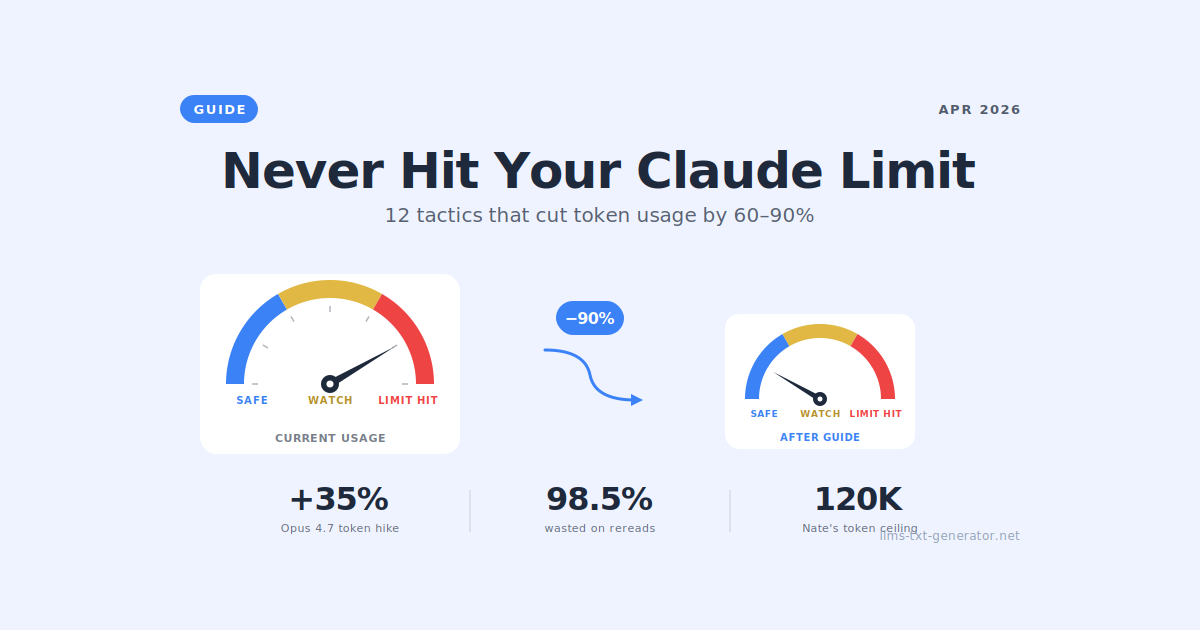
Claude Opus 4.7 Is Burning Your Tokens Faster Than Ever
Anthropic shipped Claude Opus 4.7 on April 16, 2026, and within hours, the r/ClaudeAI subreddit filled with complaints: "I asked it 2 simple questions, and I'm at 90% wtf." "One prompt and 400k tokens, 80% usage on 5-hour limit." "I literally reached my limit by asking Claude to give me two boilerplate Java classes."
Here's what's happening: Claude Opus 4.7 uses a new tokenizer that consumes 1.0–1.35x more tokens for the same input, and the new xhigh default effort level produces more output tokens than previous models. Combined with the default activation of the "Extended Thinking" features, casual users can burn through their weekly Pro limits in under an hour.
The good news: this isn't unfixable. Serious Claude Code power users have been running complex projects on Pro plans without hitting limits by applying a small set of disciplined habits. This guide synthesizes those habits — much of it drawn from Nate Herk's excellent "How to Never Hit Your Claude Limit Again" guide from the AI Automation Society — and adds current context from the Claude Opus 4.7 launch.
Master these 12 tactics, and you'll get more out of Claude Code than 99% of users.
What Is "Context" in Claude Code?
Before we talk about saving tokens, you need to understand what burns them. Context is everything Claude Code can see at one time — it's working memory for your session. This includes:
The system prompt
Your full conversation history
Every tool call and tool output
Every file Claude has read
Every skill, MCP server, or agent in your project
Claude Code has a 1 million token context window, but before you even type anything, you're already burning ~8,000 tokens of startup overhead — sometimes as much as 62,000+, depending on your configuration.
First action: In a fresh session, run /context to see how many tokens you're at before sending anything. This reveals invisible tokens from unused files, MCPs, or skills you can trim.
How Tokens Actually Work (The Compounding Problem)
A token is the smallest unit of text an AI reads and charges you for (roughly 1 word = 1 token). Here's the part most users don't realize:
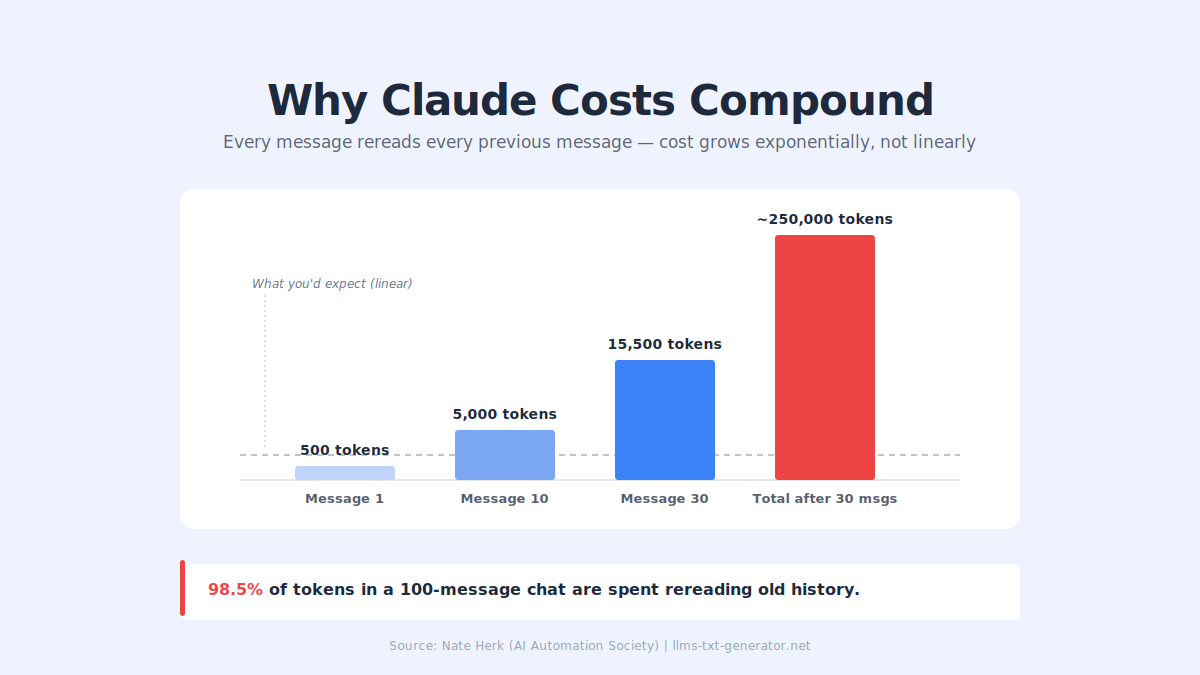
Every time you send a message, Claude rereads the entire conversation from the beginning. Message 1, reply 1, message 2, reply 2, all the way up to your latest prompt. Every single time.
Your cost isn't adding linearly — it's compounding exponentially:
Message 1 might cost 500 tokens
Message 30 might cost 15,500 tokens (31x more)
After 30 messages, you could be at ~250,000 cumulative tokens
A tracked 100+ message chat found 98.5% of tokens were spent just rereading old chat history. That's the money you're lighting on fire when you let sessions sprawl.
Context Rot: The Hidden Performance Killer
As your session grows, the model's attention spreads across every token, and performance degrades. Claude starts to:
Forget things you told it earlier
Contradict itself
Edit files without reading them first
Get vague and noticeably worse
The data is brutal: retrieval accuracy drops from 92% at 256K tokens to 78% at 1M tokens. As the model degrades, you spend more tokens to get worse outputs — a 500K-token session might produce what should have been a 200K-token result.
Claude Code has auto-compaction that kicks in at ~95% of your window. That's way too late. By then:
You only keep 20–30% of the original detail
The model is compacting at its least intelligent point (peak context rot)
It's like packing for a trip 5 minutes before you leave
The fix: Manual compaction at ~60% through your window always beats waiting for auto compaction.
The 5 Options After Every Claude Response
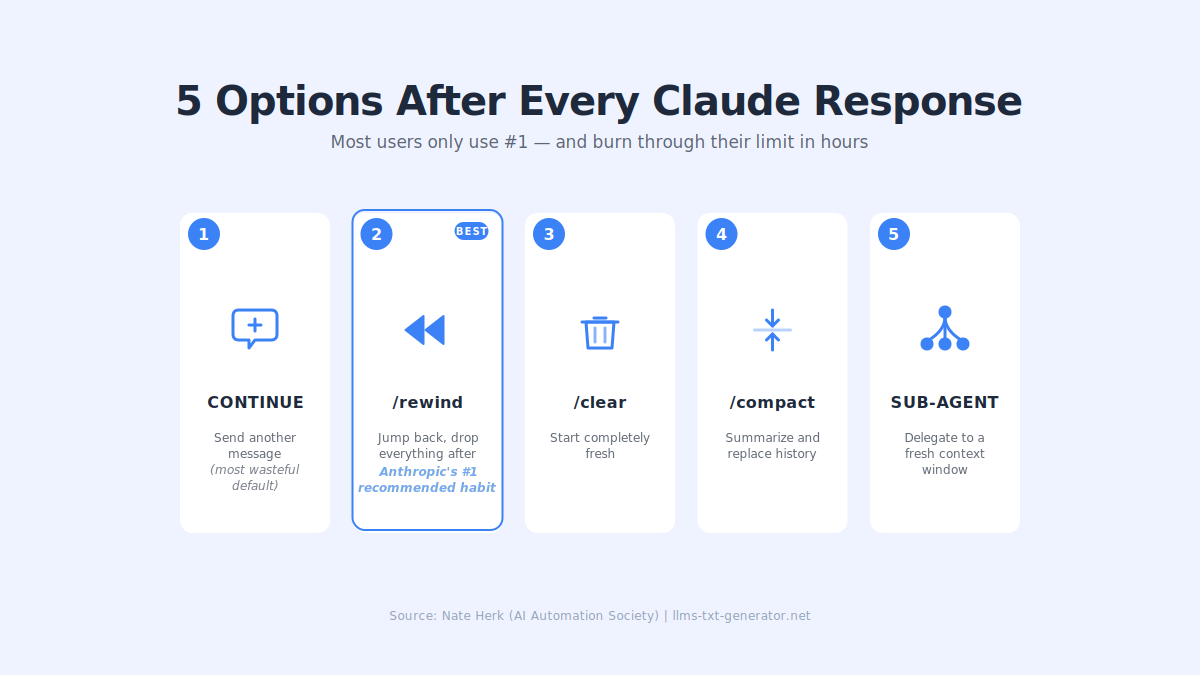
After Claude replies, you always have five choices. Most users only use option 1 — and that's why they hit limits fast.
# | Option | When to Use | Cost Impact |
|---|---|---|---|
1 | Continue | When the reply is correct, and you're building on it | Highest — compounds every turn |
2 |
| When Claude messes up — Anthropic's #1 recommended habit | Massive savings |
3 |
| When starting a new task | Resets to baseline |
4 |
| Continuing the same task, need to preserve context | Medium savings |
5 | Sub-agent | Research or summarization tasks | Best for isolated work |
Why /rewind Is Anthropic's #1 Recommended Habit
Double-tap Escape or run /rewind to jump back to any previous message. Everything after that point gets dropped.
Why this matters: when Claude messes up, and you just say "that didn't work, try this instead," the failed attempt, broken code, and wrong approach all stay in your context, polluting every future response. Rewinding keeps context clean and stops you from paying to reread failed attempts forever.
Bonus: the /rewind menu has a "summarize from here" option that creates a handoff message — a note from Claude's future self to its past self saying, "here's what we figured out, do it this way."
The Manual Compaction Method (Better Than /compact)
The official docs say:
Starting a new task →
/clearContinuing the same task →
/compact
But power users report better results with a manual method that stops using /compact entirely:
When Opus hits ~120K tokens (~12% of a 1M window), ask Claude: "Give me a full summary of everything we've done and the current status of what we're about to do next."
Copy the summary
Run
/clearPaste the summary and keep going
Critical supporting practice: Store key data in files — tracking sheets, activity logs, task lists, decision docs. A reset then doesn't feel like a reset. It's like closing all your Chrome tabs but keeping your bookmarks.
Sub-Agents: Your Secret Weapon
Each sub-agent gets its own fresh context window. It does its own research, synthesizes, and returns only the result. Think of it as a research intern — you don't watch them read 50 articles; you just want the summary.
Pro tip: Sub-agents can run on cheaper models (like Haiku) while your main session runs on Opus. Same quality for summarization tasks at a fraction of the cost. The key is knowing which tasks to delegate.
12 Proven Token-Saving Tactics
Here's the complete playbook, organized by impact:
1. Run /context on Every Fresh Session
Before typing anything, check your starting token count. Trim unused files, MCPs, skills, and claude.md bloat. A 62,000-token startup overhead cuts your usable context by 6% before you've done anything.
2. Use /rewind Instead of "Try Again"
When Claude makes a mistake, don't ask it to fix it — rewind. The broken attempt stays in context forever otherwise. Single biggest habit change for most users.
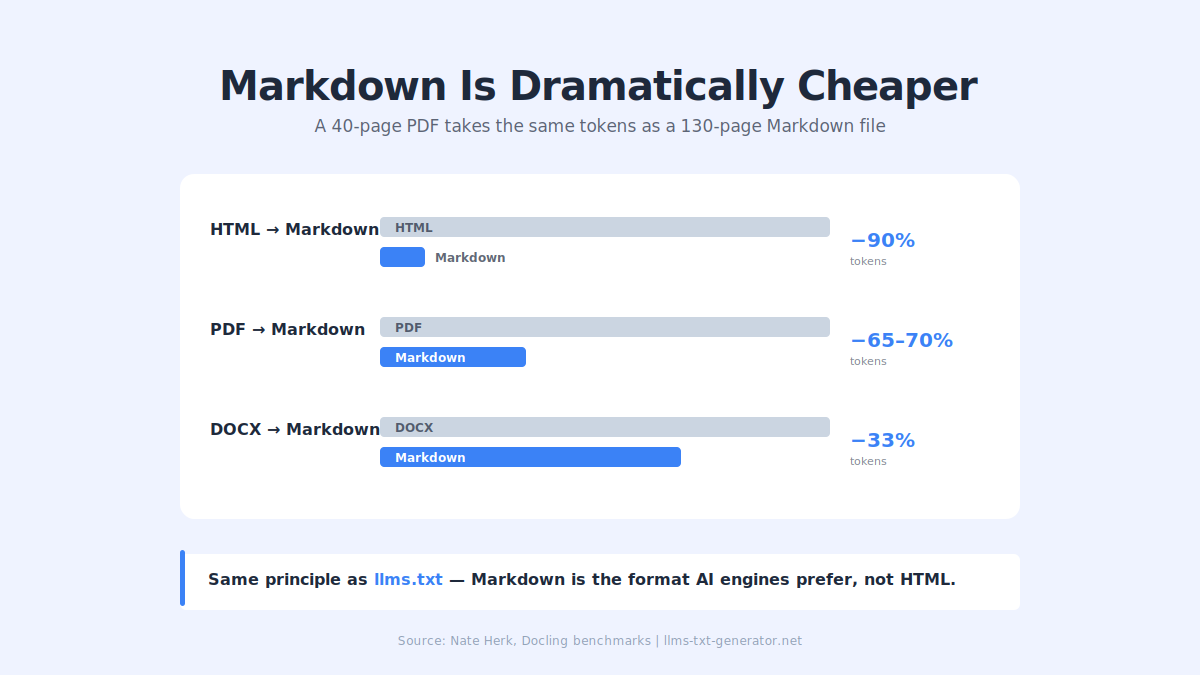
3. Convert Everything to Markdown
Markdown is dramatically cheaper than other formats:
HTML to Markdown: ~90% fewer tokens
PDF to Markdown: ~65–70% fewer tokens
DOCX to Markdown: ~33% fewer tokens
Use a tool like Docling to convert in seconds. A 40-page PDF takes the same space as a 130-page Markdown file. (Exception: if you need OCR or vision, keep the original.)
This is the same principle behind llms.txt — AI engines read Markdown dramatically more efficiently than HTML. If your website serves Markdown to AI agents, their inference costs drop, which increases the chance they'll cite you. Generate your free llms.txt file here.
4. Use /btw for Side Questions
The /btw command opens a quick overlay for side questions that don't enter your conversation history. Perfect for quick "how does this work" questions during deep work — they don't pollute your main context.
5. Start Every Session in Plan Mode
Boris Cherny (creator of Claude Code) starts every session in Plan Mode. Spending tokens upfront to get the plan right means Claude can one-shot the implementation — cheaper in the long run. Recommended tools: Ultra Plan and Superpowers.
6. Manual Compact at 60%, Not 95%
Don't wait for auto compaction. At ~60% of your window, run manual compaction (or the summary-and-clear method). You'll retain more detail and avoid compacting at peak context rot.
7. Keep Claude.md Under 200 Lines
Your claude.md file loads every session. Keep it under 200 lines / ~2,000 tokens. Only include what Claude actually needs. Move specialized instructions into context files or skills that load on demand.
8. Use .claudeignore Aggressively
Exclude large folders, build artifacts, and third-party dependencies from Claude's view. If it doesn't need to see it, don't let it.
9. Delegate to Sub-Agents on Haiku
Research, summarization, and classification tasks run great on Haiku at a fraction of the cost. Keep Opus for the actual thinking.
10. Watch Your Session Limit Constantly
Keep usage visible (second monitor if possible). Be strategic — if you're near the limit, take a break. If you're at 50% with 30 minutes until reset, push heavy work through.
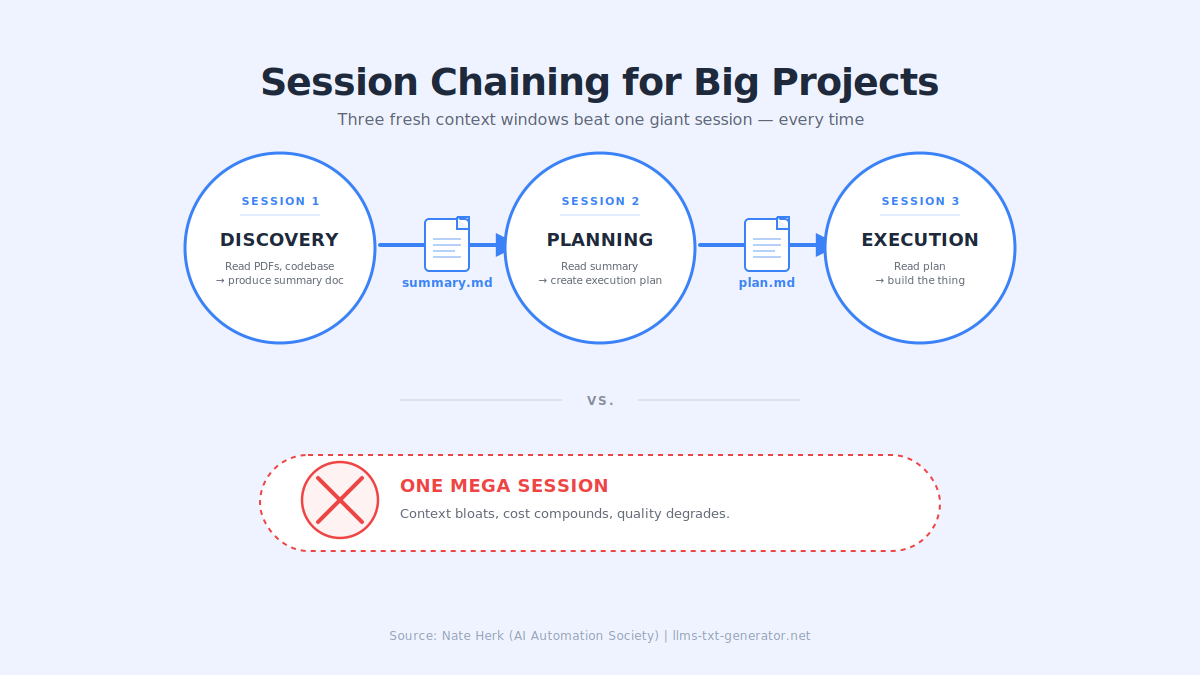
11. Chain Sessions for Big Projects
For big projects, don't do everything in one session. Chain them like an assembly line:
Session 1 — Discovery: Claude reads PDFs and the codebase, produces a summary doc
Session 2 — Planning: Reads the summary, creates a plan
Session 3 — Execution: Reads the plan, builds
Each session starts fresh with only the essential input from the previous stage.
12. Install a Token Dashboard
You can't manage what you don't measure. Custom token dashboards (several are available on GitHub, or Nate Herk's free dashboard in his School community) show sessions, input/output tokens, cache read/create stats, most-expensive prompts, most-opened files, and most-run bash commands. Lets you spot patterns you didn't realize were happening.
Why You Probably Don't Need the 1M Token Window
Three stats to internalize:
Thinking depth drops 67% as sessions get longer (analysis of 18,000 thinking blocks across 7,000 sessions). Edits without reading jumped from 6% to 34%. Longer sessions = lazier, sloppier Claude.
One user went from $345/month to $42,000/month on tokens with the same output quality. Pure bad context management.
Retrieval accuracy drops from 92% at 256K to 78% at 1M. Just because you can fill the window doesn't mean you should.
The 1M window is insurance, not a goal. The first 0–20% of your session is prime time — claude.md is freshest, and the model is most primed. Abuse the start of your sessions, not the end.
A common personal rule from power users: never go above ~120K tokens (~12% of a 1M window). Treat it as a mental ceiling, not a hard limit.
How This Connects to llms.txt
You might notice the parallel: the Markdown savings that cut Claude Code token usage by 90% are the exact same savings that AI agents get when they read a well-structured llms.txt file instead of parsing your raw HTML.
Claude Code reading a 40-page PDF vs the same content as Markdown = 65–70% fewer tokens. ChatGPT, Perplexity, and Claude browsing your website's raw HTML vs your clean llms.txt file = dramatically fewer tokens and more reliable understanding.
If you care about token efficiency in your own Claude Code sessions, you already understand why it matters for AI agents visiting your website. The math is identical. Generate your free llms.txt file now → and make your content AI-agent-efficient the same way you make your Claude Code sessions token-efficient.
Conclusion
Claude Opus 4.7's thinking features made every reasoning session consume more tokens. Anthropic will likely rebalance usage limits in the coming weeks, but the underlying principles don't change: context is finite, attention degrades, and the first 20% of any session is your most valuable thinking time.
The difference between developers who hit their Pro limit in an hour and developers who ship serious projects on the same plan is disciplined context management — not spending more. Master /rewind, adopt the manual compaction method, delegate to sub-agents, and convert everything to Markdown.
Do these things consistently, and you'll get more out of your Claude Code subscription than 99% of users — regardless of which Opus version Anthropic ships next.
Generate your free llms.txt file → and apply the same efficiency principles to how AI agents read your website.
Frequently Asked Questions
Why am I hitting my Claude usage limit so fast after Claude Opus 4.7 launched?
Claude Opus 4.7's reasoning tokens consume additional context for thinking. Combined with the new xhigh default effort level (which produces more output tokens) and removal of the manual Extended Thinking control, effective token costs rose 30–50% for many workflows without any price change. The fix is tighter context management — not spending more.
What is context rot, and how do I prevent it?
Context rot is the performance degradation that happens as your Claude session grows. Retrieval accuracy drops from 92% at 256K tokens to 78% at 1M tokens, and thinking depth drops 67% in long sessions. Prevent it by manually compacting at ~60% of your window (not the 95% auto-compaction trigger), using /rewind when Claude makes mistakes, and chaining sessions instead of running one giant session.
When should I use /rewind versus /clear versus /compact?
Use /rewind when Claude made a mistake, and you want to retry without the failed attempt polluting the context. Use /clear when starting a completely new task. Use /compact when continuing the same task, and you need to preserve context but free up space. Many power users skip /compact entirely in favor of a manual method: ask Claude to summarize, copy the summary, run /clear, paste the summary, and continue.
Is converting PDF to Markdown really 65-70% cheaper?
Yes. Docling benchmarks confirm Markdown conversion savings across formats: HTML to Markdown saves ~90% of tokens, PDF to Markdown saves ~65–70%, DOCX to Markdown saves ~33%. A 40-page PDF takes the same token space as a 130-page Markdown file. The exception is when you need OCR or vision capabilities, in which case the original format is required.
What is the 120K token rule?
Many experienced Claude Code users cap their sessions at ~120K tokens (roughly 12% of the 1M window). This comes from the old 200K context era, when 60% of the window was considered the manual compaction trigger. Treat it as a discipline mindset rather than a hard limit — the point is to stay in the "prime time" zone where Claude's attention is freshest, and context rot hasn't set in.
Should I use sub-agents or just do everything in one session?
Sub-agents are strongly recommended for research, summarization, classification, and any isolated task. Each sub-agent gets a fresh context window, does its work, and returns only the result — keeping your main session clean. Sub-agents can also run on cheaper models like Haiku while your main session uses Opus, delivering the same quality at a fraction of the cost for many task types.
What's the difference between /context and /compact?
/context is a diagnostic command that shows your current token usage — run it at the start of every session to see how many tokens your system prompt, MCPs, skills, and files are already consuming before you've typed anything. /compact is an action command that summarizes your conversation and replaces the full history with the summary to free up context space.
How does claude.md affect my token usage?
Your claude.md file loads into context at the start of every session. If it's bloated (500+ lines, detailed instructions, long examples), you're paying that cost on every fresh session. Keep it under 200 lines / ~2,000 tokens. Only include what Claude actually needs for every task — move specialized instructions into context files or skills that load on demand.
Is the 1M token context window actually useful?
It's useful as insurance but dangerous as a goal. Retrieval accuracy drops significantly at 1M tokens, and thinking depth degrades 67% in long sessions. Most serious Claude Code users operate well below the window's capacity — using session chaining, sub-agents, and manual compaction to stay in the high-performance zone. If you're new to Claude Code, start with the 200K window, learn context discipline, and graduate to 1M only when you actually need it.
How does this relate to llms.txt and AI search?
The same Markdown efficiency that saves your Claude Code tokens also benefits AI agents visiting your website. When ChatGPT, Perplexity, or Claude browse your site, they consume tokens parsing HTML — exactly as you consume tokens when your Claude.md or context bloats. A well-structured llms.txt file gives AI agents a clean Markdown summary, reducing their inference cost and improving how accurately they understand (and cite) your content. Generate your free llms.txt file to make your website AI-agent-efficient.