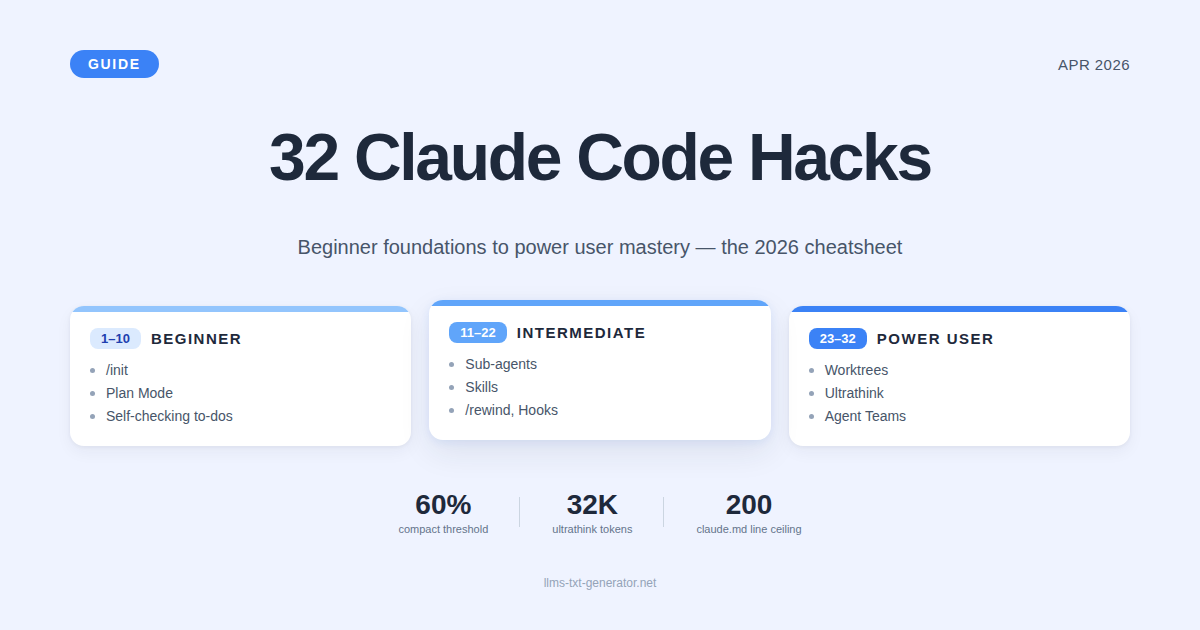
The Productivity Gap Has Never Been Bigger
Claude Code is shipping at a frantic pace in 2026 — Claude Opus 4.7 added the xhigh effort level and tripled vision resolution; Routines turned the tool into a cron-triggered cloud agent; and Anthropic now publishes its own engineering team's workflows. Most users still operate Claude Code like it's 2024.
The gap between an average Claude Code user and a power user isn't model access or budget — it's a stack of small habits that compound. This guide collects the 32 most useful of those habits, organized into three skill tiers so you can level up systematically without trying to do everything at once.
The framework here is Nate Herk's "32 Claude Code Hacks: From Beginner to Power User" guide (AI Automation Society), which we found to be the cleanest synthesis of community knowledge available right now. We've added context from Anthropic's official engineering blog, recent product changes, and our own observations running Claude Code on production blog automation. Full credit to Nate for the structure.
How This Guide Is Organized
The 32 hacks are split into three tiers, each building on the one below:
Beginner (Hacks 1–10): Foundation — context management, planning, conversation hygiene
Intermediate (Hacks 11–22): Velocity — sub-agents, custom skills, rapid undos, visual loops
Power User (Hacks 23–32): Limits — parallel sessions, agent teams, ultrathink, remote control
If you're new to Claude Code, start at #1 and work down. If you're already comfortable, scan the cheatsheet at the end and pick the 5–7 hacks you're not yet using.
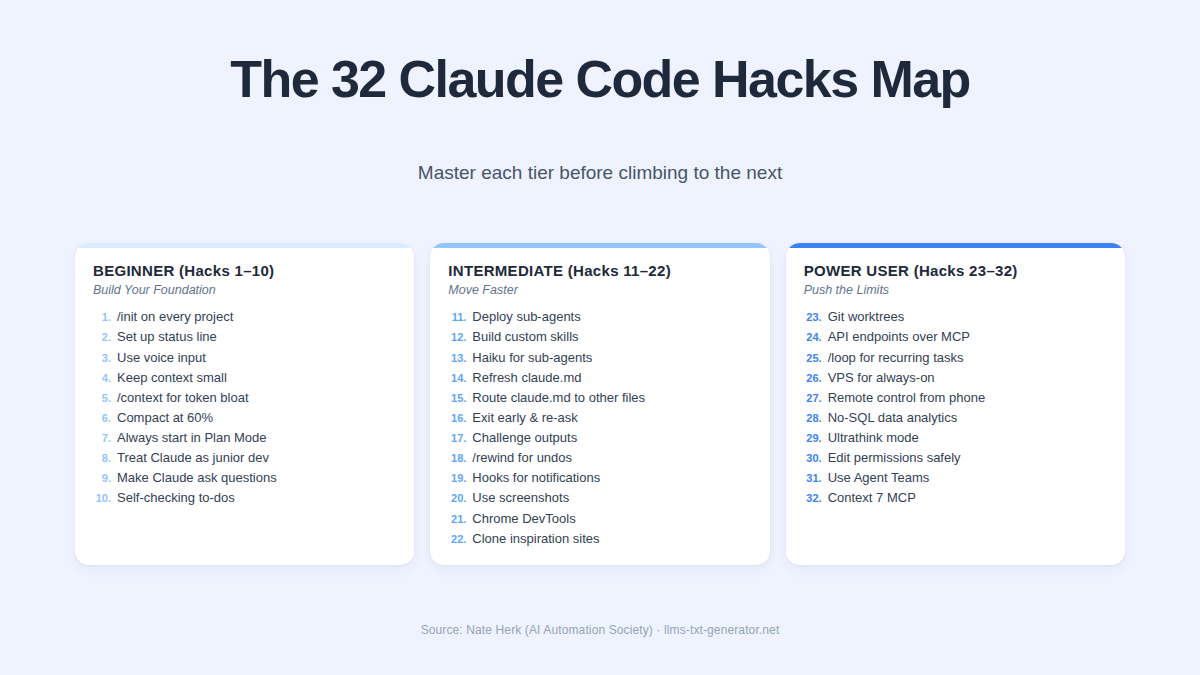
Beginner Hacks (1–10): Build Your Foundation
Hack 1 — Run /init on Every Project
For an existing codebase, run /init and Claude scans your folders, files, and architecture, then writes a claude.md file at your project root. This file loads automatically into every future session, so you never re-explain the project. For new projects, prompt Claude to draft claude.md from your stated goals, tech stack, conventions, and folder structure.
Hack 2 — Set Up a Status Line
Run /statusline and tell Claude what to display — model name, context percentage, session cost, anything visible at the terminal bottom. Claude generates a small dashboard script that gives you continuous visibility into how full your context window is. This single change prevents the most common Claude Code failure: hitting context rot without knowing it.
Hack 3 — Use Voice Input
Claude Code now ships with a native /voice command. If voice isn't enabled on your account yet, fall back to a third-party dictation app — anything that pipes spoken words into focused text fields will work. Voice input shines when planning out loud or describing requirements that would take 5x longer to type.
Hack 4 — Keep Your Context Small
The most ignored rule. Don't dump your entire codebase into a session. Give Claude only what's needed for the current task, and break big problems into small focused steps. Less noise = better Claude performance. The 1M context window is insurance, not a target.
Hack 5 — Use /context to Find Token Bloat
Run /context to see exactly what's consuming your token budget. Claude breaks usage down by system prompt, file contents, MCP servers, and other inputs as percentages. When a session feels heavy, this command tells you what to trim.
Hack 6 — Compact at 60%, Clear Between Tasks
Don't wait for auto-compaction at 95% — by then context rot has already set in. At ~60% of your context window, run /compact with custom instructions like "compact but keep all API integration decisions and database schema." Claude shrinks everything else while preserving what matters. Switching tasks entirely? Use /clear — your claude.md stays intact.
Hack 7 — Always Start in Plan Mode
Hit Shift + Tab to cycle to Plan Mode. Claude can still read and research but won't write or edit until you approve. It maps the approach, asks clarifying questions, and surfaces tradeoffs before touching code. Once you approve, switch out and execute. This single habit prevents most "Claude wandered off course" frustrations.
Hack 8 — Treat Claude Like a Junior Developer
Don't always issue commands like "write me a function that does X." Sometimes give Claude problems: "How should we handle growth tracking?" Let it reason through tradeoffs and explain assumptions. The output quality jumps noticeably — and you catch flawed assumptions before any code gets written.
Hack 9 — Make Claude Ask Questions
Tell Claude explicitly: "Continuously ask me questions until you're 95% confident you understand exactly what I need and what you need to do." This Socratic approach replaces three or four rounds of revisions with one upfront alignment.
Hack 10 — Build Self-Checking Into the To-Do List
When Claude generates a to-do list, build verification steps directly into it. Example: 1) build the page, 2) take a screenshot and visually confirm layout, 3) open Chrome DevTools and check console for errors. Add the rule: "Don't move to the next to-do until you're 95% confident the current one is good." Hitting 90% on a one-shot beats 60% every time.
Intermediate Hacks (11–22): Move Faster
Hack 11 — Deploy Sub-Agents for Parallel Work
Tell your main session to use sub-agents for complex problems. Each gets its own isolated context window and (optionally) its own model. Sub-agents work in parallel on research, tests, or alternative approaches, then report back. Anthropic's own engineering team explicitly recommends telling Claude: "Use a sub-agent to review this code for security issues."
Hack 12 — Build Custom Skills
Create reusable prompt files in your .claude/skills directory. Examples: techdebt.md defines exactly how Claude scans for technical debt; code-review.md defines your team's review checklist. Invoke via natural language or slash command — same workflow runs identically every time. Commit them to your repo so the team uses the same SOPs.
Hack 13 — Use Haiku for Sub-Agents
You can set the model on each sub-agent. For simple processing — scraping, classification, summarization — use Haiku. It's a fraction of the cost and still nails the job. Example: a Haiku sub-agent reads 200K tokens of articles and sends a 2K token summary to your Opus main thread.
Hack 14 — Constantly Refresh Your claude.md
Whenever Claude discovers a new pattern, gotcha, convention, or you adopt a new skill — update claude.md. Next session, Claude already knows. Watch for bloat though: claude.md loads on every conversation and eats context. Practical ceiling: 150–200 lines. If it grows beyond that, trim or split.
Hack 15 — Have claude.md Route to Other Files
Keep claude.md lean by linking out to separate files for style guides, business context, and reference docs. The system prompt doesn't need every project's detailed status — it just needs to know where to find the information. This is the same principle behind llms.txt for websites: a clean structured map beats a dump.
Hack 16 — Exit Early and Re-Ask
If Claude starts going down the wrong path, don't wait for it to finish. Hit Escape, correct course, re-prompt. Every token spent in the wrong direction is wasted context. Steer tight, steer early.
Hack 17 — Challenge Outputs Aggressively
If Claude gives you something that's just "okay," push back: "Scrap that, do a more elegant version" or "This isn't good enough — try again with a completely different approach." Claude often produces dramatically better output when the bar gets reset higher. Critical follow-up: when a better version lands, tell Claude to update its skill or claude.md so the same mistake doesn't repeat.
Hack 18 — Use /rewind for Quick Undos
Wrong turn? Type /rewind and Claude rolls back to any previous point in the conversation. Anthropic now describes this as the single-biggest habit change for most users — cleaner than clearing and restarting, and it preserves the work that came before the wrong turn.
Hack 19 — Use Hooks for Notifications
Type /hooks or describe in natural language what you want — Claude configures the hook for you. Common use: trigger an audio alert when Claude finishes a task. This frees you to context-switch (or run 15 parallel Claude Code sessions) and react only when one needs input.
Hack 20 — Use Screenshots
Claude can see images. Feed it error screenshots, design references, or live page captures. Build a self-check loop: "Take a screenshot of the page and tell me if the layout looks right." Practical pattern: design → screenshot → fix → repeat. Three iteration passes before V1 produces a dramatically better first version.
Hack 21 — Use Chrome DevTools
Claude can drive a real browser, click through flows, and verify functionality — not just static design. Excellent for front-end work where you want behavior validation, or for filling out forms when the explicit API is unavailable. Best when you're already signed in somewhere and Claude only needs to navigate.
Hack 22 — Clone Inspiration Sites
Take screenshots of sites you like, feed them to Claude, prompt: "make our page look like this." Claude recreates layout patterns without producing the generic AI-slop look. Even better — feed in actual HTML and CSS from the source as inspiration. Use the result as a template, then layer your brand on top.
Power User Hacks (23–32): Push the Limits
Hack 23 — Run Parallel Sessions With Git Worktrees
Two Claude Code sessions in the same folder will overwrite each other. Worktrees solve this by creating isolated parallel copies on separate branches. Run claude-worktree <feature-name> in one terminal, repeat with a different name in another, and you have multiple coding agents working in parallel. Anthropic's engineering team reports running 3–5 sessions concurrently as their biggest unlock.
Hack 24 — Use API Endpoints Instead of MCP Servers
MCP servers are convenient but load all tool definitions into context. If tokens are tight and you only need one specific endpoint (e.g., reading one Notion database), skip the full MCP and call the direct API. You save substantial context for the same functionality.
Hack 25 — Use /loop for Recurring Tasks
Tell Claude something like: "Every 5 minutes, check the deployment status." Claude reruns that prompt on a schedule within the same session. Great for monitoring PRs, build pipelines, or error logs. Caveat: /loop sessions max out at 3 days. For longer schedules, use Desktop Scheduled Tasks (which spin up in fresh sessions without prior memory).
Hack 26 — Host on a VPS for Always-On Sessions
Run Claude Code on a remote server so it stays running with your laptop closed. SSH in to interact, or wire it to Telegram for chat-based control. Perfect for long-running tasks where you don't want to babysit a local terminal.
Hack 27 — Remote Control From Your Phone
Claude Code supports controlling local sessions from your phone or any browser. Start a heavy task at your desk, walk away, keep steering from your phone while you grab coffee. Your code never leaves your local machine — only the remote control connection lives on the phone.
Hack 28 — No-SQL Data Analytics
Connect CLI tools (BigQuery's bq, the Snowflake CLI, etc.) to Claude Code. Then ask plain-English questions: "What were our top 10 revenue sources last quarter?" Claude writes the query, runs it, and returns results. Pattern works for any CLI-driven tool.
Hack 29 — Ultrathink for Hard Problems
Type the literal word ultrathink when Claude is stuck or facing a complex architecture decision, debugging session, or major refactor. The terminal goes colorful and Claude allocates its maximum thinking budget — roughly 32,000 tokens — before responding. Don't use it for simple fixes. Reach for it when decisions affect the whole system.
Hack 30 — Edit Permissions for Safe Autonomy
Many demos show --dangerously-skip-permissions for full autonomy. It's fast but called dangerous for a reason. Smarter approach: open your permissions and explicitly allow commands you know are safe, and explicitly deny anything destructive (deletes, removes, force pushes). Same speed, far less risk. Important: the deny list takes priority over the allow list.
Hack 31 — Use Agent Teams
Sub-agents (#11) run in parallel with fresh context but can't talk to each other. Agent Teams can. Team members share a task list, coordinate, and even assign work between themselves. You can address individual agents directly. Costlier and longer-running than sub-agents — but for big multi-part projects, the cohesion is worth it.
Hack 32 — Install Context 7 MCP
Claude's training data has a cutoff, so it sometimes suggests deprecated APIs or renamed functions. Context 7 MCP fixes this by injecting up-to-date, version-specific documentation and live code examples from thousands of popular libraries (Next.js, React, MongoDB, Django, etc.) before Claude writes any code. One install, every coding agent gets fresher information.
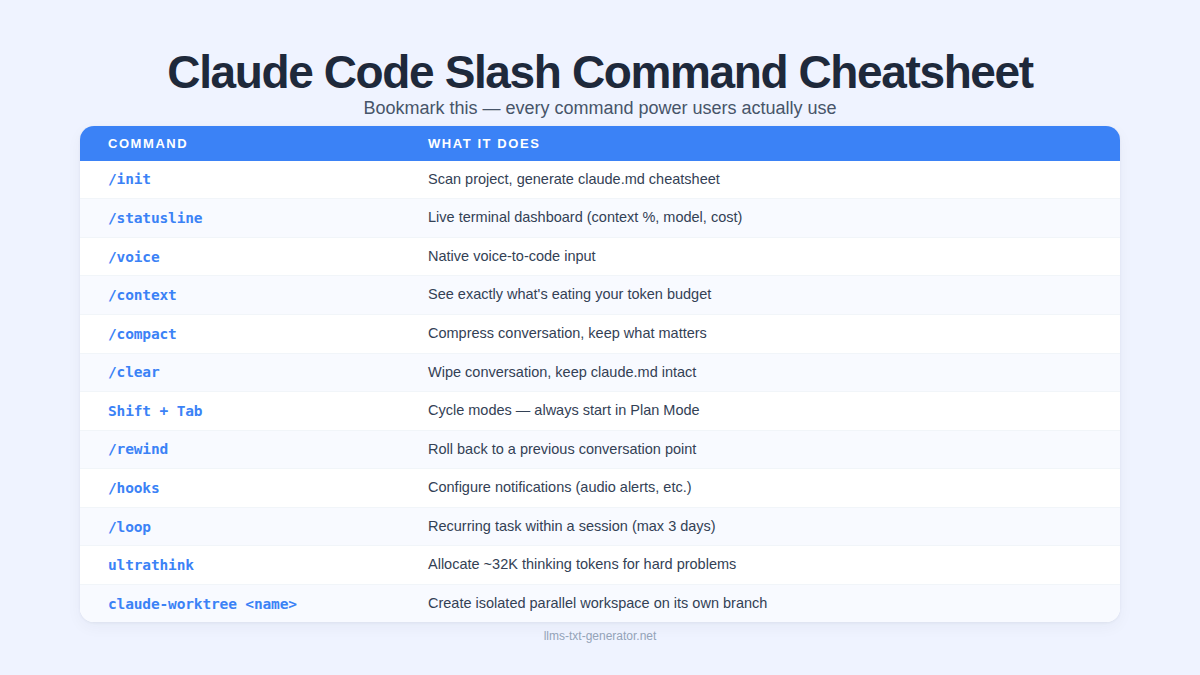
The Slash Command Cheatsheet
Bookmark this. Every command power users actually use:
Command | Purpose |
|---|---|
| Scan project, generate |
| Live terminal dashboard (context %, model, cost) |
| Native voice-to-code input |
| See exactly what's eating your token budget |
| Compress conversation, keep what matters |
| Wipe conversation, keep |
Shift + Tab | Cycle modes — always start in Plan Mode |
| Roll back to a previous conversation point |
| Configure notifications (audio alerts, etc.) |
| Recurring task within a session (max 3 days) |
ultrathink | Allocate ~32K thinking tokens for hard problems |
| Create isolated parallel workspace on its own branch |
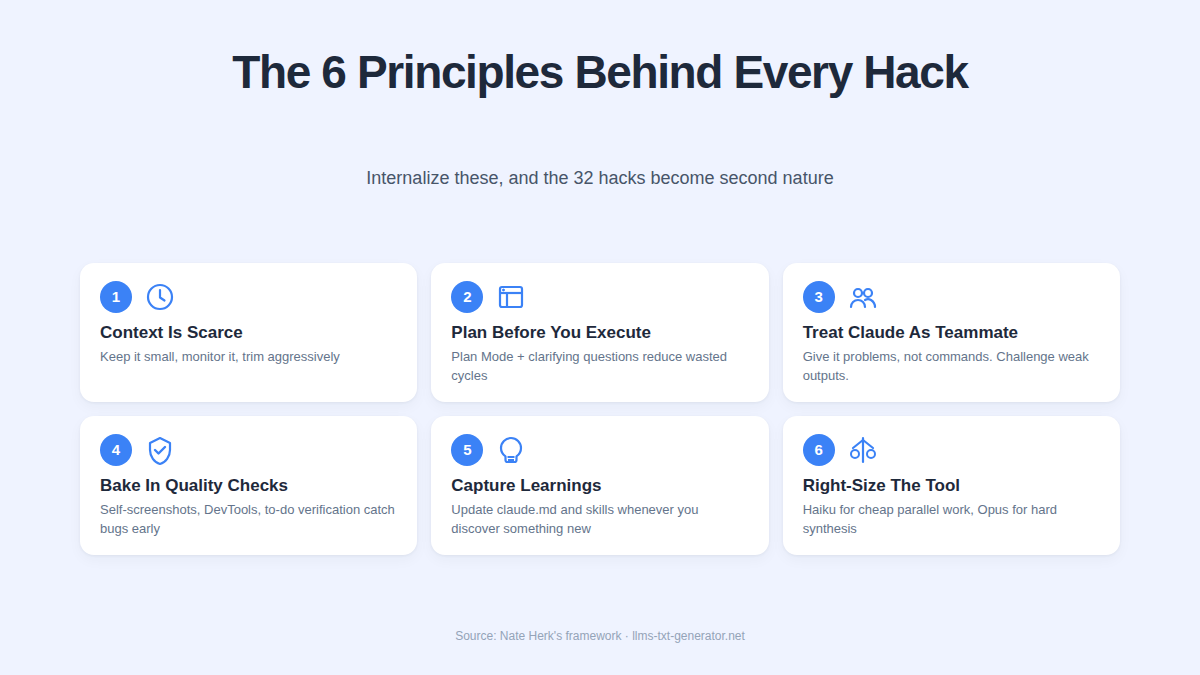
The 6 Core Principles That Tie It All Together
Most of the 32 hacks reduce to a handful of mindsets. Internalize these and the rest become reflexes:
Context is your scarcest resource. Keep it small, monitor it, trim aggressively.
Plan before you execute. Plan Mode, clarifying questions, and the 95% confidence rule eliminate most wasted cycles.
Treat Claude as a teammate, not a vending machine. Give it problems, let it reason, push back on weak outputs.
Bake quality checks into the work. Self-screenshots, DevTools verification, and to-do verification catch issues before you do.
Capture learnings. Update
claude.mdand your skills directory whenever Claude figures out something new.Right-size the model and the tool. Haiku for cheap parallel work, Opus for hard synthesis, direct APIs when MCP overhead is too heavy.
How This Connects to Your Website
You'll notice a recurring theme across these 32 hacks: structured, machine-readable inputs win. Markdown beats raw HTML. claude.md beats re-explaining your project. Skills beat one-off prompts. Linked files beat bloated system prompts.
The same principle that makes Claude Code productive — clean structure, lean context, machine-readable signals — is exactly what makes your website visible to AI agents like Claude, ChatGPT, and Perplexity. When AI agents browse your site, they pay token costs to parse messy HTML. A clean llms.txt file gives them the equivalent of a claude.md for your domain — a structured map of what your site covers and how it's organized.
Generate your free llms.txt file in 60 seconds — apply the same context-efficiency principles to your website that you apply to your Claude Code sessions.
Conclusion
The gap between an average Claude Code user and a power user isn't budget or model access — it's a stack of small habits applied consistently. The 32 hacks here aren't tricks; they're the operating system the most productive Claude Code users have built over thousands of sessions.
If you take only one thing from this guide, take this: context is finite, and the first 20% of your session is the most valuable thinking time you'll get. Plan Mode, /init, manual compaction at 60%, and /rewind over "try again" will save more tokens and produce better output than any other change you make.
Full credit again to Nate Herk's AI Automation Society for the original framework. The mental model holds whether you're shipping features in production or learning Claude Code for the first time.
Generate your free llms.txt file → and apply context efficiency to your website too.
Frequently Asked Questions
What's the single most impactful Claude Code habit to adopt first?
Run /init on every project, immediately. It generates a claude.md file mapping your codebase that loads automatically into every future session. The 2-minute investment eliminates 10–15 minutes of project re-explanation per session, forever. Pair it with always starting in Plan Mode (Shift + Tab) for the next biggest jump.
What is /context and why does it matter?
The /context command shows you exactly what's consuming your token budget — broken down by system prompt, file contents, MCP servers, and conversation history. Run it at the start of every session to spot bloat (some users discover 60K+ tokens of overhead before typing anything). Trim what you don't need, then start working with a clean window.
When should I /compact vs /clear vs /rewind?
Use /compact when continuing the same task and need to free up context — it summarizes conversation history while keeping key decisions. Use /clear when starting a fresh task — your claude.md stays intact. Use /rewind when Claude makes a mistake — it rolls back to a previous point and drops the wrong turn from context, which is usually better than asking Claude to "try again" (which keeps the failed attempt polluting future responses).
What does "ultrathink" actually do?
Typing the literal word ultrathink tells Claude to allocate its maximum thinking budget — roughly 32,000 tokens — before responding. Use it for architecture decisions, complex debugging, big refactors, or when standard prompting isn't producing quality output. Don't use it for simple fixes — it's expensive in time and tokens.
How big should my claude.md file be?
Practical ceiling: 150–200 lines. The claude.md loads as part of your system prompt on every conversation, so every line costs context. Keep it focused on conventions, gotchas, and key folder structure. Move detailed style guides, business docs, and reference material into separate files and have claude.md link to them — Claude can fetch on demand instead of loading everything every session.
What's the difference between sub-agents and Agent Teams?
Sub-agents (Hack #11) run in parallel with fresh isolated context windows but cannot communicate with each other — they each report back to your main agent. Agent Teams (Hack #31) share a task list, communicate with each other, and can assign work between themselves. Sub-agents are faster and cheaper for parallel research tasks. Agent Teams are better for cohesive multi-part projects but cost more and run longer.
Should I use Haiku or Opus for sub-agents?
Use Haiku for simple parallel work — research scraping, classification, summarization, processing large volumes of text. It's significantly cheaper and gets the job done. Reserve Opus for the main session that needs to synthesize, make architecture decisions, or write production code. Example: a Haiku sub-agent reads 200K tokens of articles and sends a 2K-token summary back to your Opus main thread.
What is Context 7 MCP and why install it?
Claude's training data has a knowledge cutoff, so it sometimes suggests deprecated APIs, renamed functions, or removed library features. Context 7 MCP fixes this by injecting up-to-date, version-specific documentation and live code examples from popular libraries (Next.js, React, MongoDB, etc.) into your conversation before Claude writes code. One install, every coding session gets fresher information — a dramatic quality lift for any project using rapidly-evolving libraries.
Are git worktrees safe to use with Claude Code?
Yes, and they're strongly recommended for any parallel work. Each worktree is an isolated copy of your project on its own branch — two Claude Code sessions in the same folder would overwrite each other, but worktrees prevent that. Run claude-worktree <feature-name> to spin up an isolated workspace, then merge branches normally when done. Anthropic's engineering team uses this pattern for 3–5 parallel sessions as their biggest productivity unlock.
How does Claude Code productivity relate to llms.txt for my website?
The same principles apply to both. Claude Code performs better with clean, structured context (claude.md, lean conversation history, Markdown over HTML). AI agents browsing your website face the same problem — they pay token costs parsing messy HTML and waste context on navigation/footers/scripts. An llms.txt file gives AI agents a clean structured map of your website, exactly like claude.md does for your codebase. Generate your free llms.txt file to apply context efficiency to your site.